Two-way sync puts every email with a lead or client in the CRM, right next to their texts and calls. Replies you send from the app go out from your real address.
Settings › My Profile
My Profile
Business Profile
Integrations
Email Services
Calendars
My Staff
My ProfileYour info, email, calendar and alerts
Settings › My Profile
GeneralEmail and conversationsCalendarNotifications
Email and conversationsSync your inbox with the CRM
Settings › My Profile › Email and conversations
GeneralEmail and conversationsCalendarNotifications
GmailGmail or Google Workspace
Connect
OutlookOutlook or Microsoft 365
Connect
accounts.google.com
Sign in with Google
Y
Youyou@yourcompany.com
Your Business wants to read, send and manage your email.
CancelAllow
Settings › My Profile › Email and conversations
✓ you@yourcompany.com · Connected
Auto Bcc syncBcc this address and the email gets logged to the contact
Step 1 of 5
Open Settings, then My Profile.
Animated walkthrough
How to do it
Open Settings, then My Profile.
Click the Email and conversations tab.
Click Connect on Gmail (Gmail or Google Workspace) or Outlook (Outlook or Microsoft 365).
Sign in with your business email, not a personal one, and click Allow.
Check that it says Connected. Then send yourself a test and reply. The reply should show up on the contact.
Good to know
Each team member connects their own inbox from their own login.
The Auto Bcc address is handy when you email from your phone. Bcc it and the email lands on the contact.
This is your inbox. Campaign emails use a separate sending domain. See Set up your sending domain.
If it says "access denied," your Google or Microsoft admin may need to allow third-party apps.
Tip
Use the account that owns the mailbox. If someone else set up your email, ask them to sign in with you.
Step 5Owner⏱ 15 min, then a quick check each month
Connect your socials and keep them connected
Connect each profile once and you can plan, post and see results for every platform from one place. Connections expire now and then, so this also shows you how to reconnect.
Marketing › Social Planner
Social PlannerPlan and post everywhere from one place
Bring in your past customers and leads so you can text, email and advertise to them. Import a spreadsheet, pull straight from HubSpot, or sync from QuickBooks.
CRM › Contacts
ContactsAll · 0 contacts
Import
Contacts › Import data
Import records from CSVUpload a CSV, map fields, review and import
Start CSV import
Import from HubSpotRecords, custom fields and associations
Connect HubSpot
Imports › 2 Upload
1 Start2 Upload3 Map4 Verify
⬆ past-customers.csv
Imports › 3 Map
Column in file
Status
Field
First_Name
Mapped
First Name
Phone
Mapped
Phone
Customer_Type
Not mapped
Tags
Notes_2019
Not mapped
Skip
Imports › 4 Verify
1 Start2 Upload3 Map4 Verify
Ready to import412 rows · 398 new · 14 updates
Import
CRM › Contacts
✓ 412 contacts imported
Smart listsAll · Past customers
Save as smart list
Step 1 of 6
Open CRM, then Contacts, and click Import.
Animated walkthrough
How to do it
Export your list from your old CRM, QuickBooks or a spreadsheet as a CSV file (30 MB max). Add a column that says what they are, like past customer.
Open CRM, then Contacts, click Import, then Start CSV import.
Step 1, Start: pick Contacts. Step 2, Upload: add the file and keep Create and update contacts.
Step 3, Map: match each column to a field. Map your "what they are" column to Tags. Leave junk columns unmapped and check "Don't import data in unmapped columns."
Step 4, Verify: check the counts and import. Your progress shows under Import history.
Filter by that tag and save a smart list.
Good to know
Coming from HubSpot? Pick Import from HubSpot and connect your account instead of using a file.
Using QuickBooks Online? Connect it and turn on Contact sync. Customers come in on their own. See Connect QuickBooks.
It matches existing contacts by contact id, then phone, then email, so re-importing updates people instead of doubling them.
Only import people who did business with you or asked to hear from you.
Tip
Download the sample file on the Upload step. Matching its column names makes mapping almost automatic.
When a consultation is booked, add the meeting booked tag. When it is marked showed, add meeting held. When a proposal is sent, add proposal sent.
Workflow › Tagging new leads
Appointment bookedStatus: showedProposal sent
Add tagAdd tagAdd tag
Workflow › Tagging new leads
✓ No errors
Test workflowPublish
Step 1 of 6
In AI › Ask AI, ask for the tags you want.
Animated walkthrough
See it in actionWorkflow automations
Build follow-up once and it runs every time. Text new leads in seconds, call them with AI, book the estimate and move the deal, without anyone lifting a finger.
Automations › New lead to booked estimateSearch✦ Ask AI
BuilderSettingsEnrollment historyExecution logs
Publish
214 enrolled81% replied73 estimates booked● Published
+100%−
Workflow trigger
⚡
Form submittedGet a quote · website
⋯
Facebook lead formKitchen remodel ad
⋯
+
💼
Create opportunitySales pipeline · New lead
⋯
+
💬
Send text"Thanks! We'll call within 15 min."
⋯
+
👤
Notify ownerText + app alert
⋯
+
⏱
Wait15 minutes
⋯
+
⑂
If / ElseDid they reply?
Replied+
📅
Send booking linkEstimate calendar
⋯
+
🏷️
Move opportunityEstimate booked
⋯
END
No reply+
☎
AI voice agent callsAnswers questions, books
⋯
+
⏱
Wait1 day
⋯
+
✉
Send email5 kitchen ideas + reviews
⋯
END
Example business and numbers. Your screens show your own.
How to do it
Open AI, then Ask AI, and ask it to create the tags you want. Approve the card.
Open Automations, then Workflows, and click Build using AI.
Describe when each tag should be added. Answer any questions it asks.
Check the triggers. A red dot means a step needs a value. Click it to see how to fix it.
Click Test workflow, then turn on Publish.
Make a smart list for each tag, so you can see everyone at that stage.
Good to know
For "meeting held," use the appointment status Showed. "Any status change" would also tag cancellations.
A workflow cannot make smart lists, but smart lists filter by tag and fill up on their own.
Tip
Start with three or four tags. You can always add more later.
An AI agent can text and email new leads, get them booked, rebook no-shows and ask your intake questions. You approve everything before it goes live.
AI › Getting Started
I want to set up an AI agent for my business. Can you help me get started?
AI › Ask AI
What kind of AI agent?1 of 3
Chat agent (Conversation AI)
Voice agent
Custom workflow agent
Not sure, recommend one
AI › Ask AI
Anything else I should know?3 of 3
Follow up with new leads by text and email until they book a free consult. Rebook no-shows. After they book, ask what year they started, their website and how they get leads now.
AI › Ask AI
Draft is readyNothing is live yet
✓ Uses your consult calendar
✓ Never makes up prices
✓ Hands off to a person when asked
Check: your text number is registered
AI › Ask AI
Create the agent now?
Yes, create it as a draft (not live)
No, I want to review first
Step 1 of 5
Open AI, then Getting Started, and open Ask AI.
Animated walkthrough
See it in actionAI agent follow-up
The AI agent texts and emails new leads right away, answers questions and asks them to book. When they say yes, it books the visit and moves the deal for you.
Conversations › AllSearch✦ Ask AI
UnreadRecentsStarredAll
+ New message
DK
Dana K.Sat works! See you then.
2m
MT
Marcus T.Can you do evenings?
18m
PS
Priya S.Opened: 5 deck ideas + a time to meet
1h
OR
Owen R.Booked: Thu 4:00 PM estimate
3h
New lead from Google Ads · Kitchen remodel · Lakeville
✦ AI agent · EmailYour kitchen ideas + a time to meet?
Hi Dana, thanks for reaching out about your kitchen. I put together a few layouts homeowners in Lakeville love. Would you like to walk through them at a free design visit?
✦ AI agent · Text
Hi Dana, it's Sam's assistant at Your Remodeling Co. I have Thu 4:00 PM or Sat 10:00 AM open for your design visit. Which works?
Sat works! See you then.
✦ AI agent · Text
You're booked for Sat 10:00 AM. We'll send a reminder the day before. Reply anytime with questions.
📅 Appointment booked · Sat 10:00 AM · Opportunity moved to Estimate booked
SMSEmail
Type a message, or let the AI agent reply…
Send
DK
Dana K.Lakeville, MN · Kitchen remodel
Source
Google Ads
Lead score
86 · Hot
Budget
$60k to $80k
Next
Design visit, Sat 10:00 AM
✦
AI agent is onTexts, emails and books 24/7
Example business and numbers. Your screens show your own.
How to do it
Open AI, then Getting Started, and open the Ask AI panel.
Tell it you want an AI agent and answer its three questions: the type, the main job and anything else it should know.
Read the draft. It lists what the agent does, its guardrails and what to check before turning it on.
Answer its follow-up questions, like which calendar to book into.
Create it as an inactive draft. Review the instructions, then turn it on with our team.
Good to know
The agent needs a registered text number and a sender email address before it can message anyone.
It needs a workflow to hand contacts to it, like "new lead has not booked." Ask AI can draft those too.
Auto-pilot replies cost a small amount per message. Ask AI shows the rate.
Write down the questions you ask on every first call. That is the best starting point for your agent.
Tip
Start in suggestive mode, where it drafts replies and you approve them. Switch to auto-pilot once you trust it.
Send us
Tell us when the draft is ready and we will review it with you.
Ad conversions and audiences (our team sets these up)
Conversions tell Google which ads bring real leads and sales. Audiences let you show ads to your past customers and people like them. We set these up with you.
Ad Manager › Settings › Conversions
Conversions0 conversions
Create a new conversion
Ad Manager › Settings › Conversions
Conversion
Source
Value
New lead
Submit lead form
Same
Calendar booked
Book appointment
None
Purchase
Purchase
Real sale amount
Ad Manager › Settings › Audience segments
Customer match · your customer list
Website visitors
Interest segments
Lookalike segments
Audience segments › Customer match
Customer match
Upload fileUse smart list
Audience segments › Lookalike
Lookalike
Step 1 of 5
In Ad Manager › Settings › Google ads, open Conversions.
Animated walkthrough
How to do it
We create the conversions in Ad Manager › Settings › Google ads › Conversions.
New lead fires when a lead form is sent. Calendar booked fires when someone books. Purchase sends the real sale amount from a workflow.
Import your customer list into the CRM and save it as a smart list first.
We build a customer match audience from that smart list, then a lookalike from it.
We check that conversions show up within a few days.
Good to know
Customer match from a smart list stays up to date. A one-time CSV upload goes stale.
You agree to Google's customer match rules when you use your list. Only use people who did business with you.
Send us
Get your customer list into the CRM before our ads call.
Click anything on your site and change it, or type what you want. Preview it, then publish.
AI › AI Studio
Your websitePublished · edited 2 hours ago
AI Studio › Your website
Kitchens and basements, built right in Lakeville.
AI Studio › Your website
Make this headline say Prior Lake on the Prior Lake page.
✦ Visual edit · 1 tool used
Preview
AI Studio › Your website
Kitchens and basements, built right in Prior Lake.
Publish
yourcompany.com
✓ Published
Kitchens and basements, built right in Prior Lake.
Step 1 of 5
Open AI, then AI Studio, and open your website.
Animated walkthrough
See it in actionEdit your website
This is Mashbooks, a CPA firm site our team built, open in the editor. Click anything and change it, or just ask, even with a screenshot from your phone. Preview it, then publish.
◉ Preview</>▭ /Publish
MashbooksClean books. Taxes planned.Book a Free Review →
Your numbers are in expert hands.
Direct oversight from an experienced CPA who understands the weight of your business decisions.
The fastest way to change your website or ask us for help is a screenshot. Grab it, mark it up, paste it into the AI Studio chat or a message, and say what you want.
yourcompany.com
Kitchens and basements, built right in Lakeville.
CleanShot X · Annotate
Kitchens and basements, built right in Lakeville.
➜ change to Prior Lake
AI Studio › Your website
Change this headline to Prior Lake on the Prior Lake page.
AI Studio › Your website
✦ Visual edit · headline updated
PreviewPublish
Step 1 of 4
Press your screenshot shortcut and drag over the part you want to change.
Animated walkthrough
How to do it
Mac: we recommend CleanShot X. It takes screenshots, marks them up, records your screen and captures long pages, and everything lands on your clipboard ready to paste.
Mac, free: press ⌘ Shift Control 4 and drag. It copies straight to your clipboard. Press ⌘ Shift 5 to record your screen.
Windows, free: press Windows Shift S for the Snipping Tool. It copies to your clipboard, and it can record your screen too. ShareX is a free option with more tools.
iPhone: press the side button and volume up, tap the preview to mark it up, then share or copy it. Android: press power and volume down.
Paste the screenshot into the AI Studio chat, a Conversations message, or an email to our team, and add one line on what you want.
Good to know
One screenshot plus one sentence beats a long email every time.
Crop to the part that matters. Blur or cover anything private, like client names or card numbers, before you send it.
Screen recordings are great for "this button does something weird." Keep them under a minute.
Tip
Set your screenshot tool to copy to the clipboard by default. Then it is always grab, paste, done.
Drop in photos and the details, and AI builds the project page, adds it to your Projects grid and makes the slideshow.
AI Studio › Your website
Ask AI…
AI Studio › Your website
AI Studio › Your website
Johnson deck, Lakeville. Composite boards, cable rail, fire table. 3 weeks. Add it to Projects with a slideshow.
Send ↑
AI Studio › Your website
✦ 3 tools used · project page, Projects grid, slideshow
Preview
yourcompany.com/projects
Johnson deckLakeville · 3 weeks
Publish
Step 1 of 5
In AI Studio, open your website and click into the chat.
Animated walkthrough
See it in actionUpdate client projects
Drop in your photos, paste the details, and AI builds the project page, adds it to your Projects grid and makes the slideshow. Shown with Destination Decks photos from our shoot. The project details are an example.
Getting set up the right way is what makes everything after it work. This list walks you through it in order, one step at a time. Most steps take a few minutes. A few take an afternoon. You don't have to do it all at once.
▶Video walkthrough coming soonShort welcome video from Rob: how the list works and what happens after.
How to do it
Work top to bottom. Each step builds on the one before it.
Check off each step as you finish it. Your progress saves in this browser.
Some steps are only for new businesses or for builders. They are tagged so you can skip what doesn't apply.
Stuck? Take a screenshot and send it to support@feedbackwrench.com. We'll walk you through it.
Tip
Bookmark this page. You'll come back to it a lot in your first few weeks.
Step 2You⏱ 15 min
Your shared folder
We set up one shared Google Drive folder for your business. It's where your logos, photos, brand files and documents go, so nothing gets lost in email.
▶Video walkthrough coming soonScreenshot of the shared folder with logo, photo and brand subfolders.
How to do it
Open the shared folder link from your welcome email and bookmark it.
Upload your logo files. Vector files (AI, EPS, SVG or PDF) are best.
Make folders for your photos and add your best work, organized by project.
Add any brand guides, brochures or past marketing you like.
Upload into our folder. Please don't share your own folders with us. It keeps everything in one place.
Send us
Tell us when your logo and first photos are in.
Tip
Name folders by project and date, like "2025-06 Smith Patio". It saves hours later.
Step 3You and your key people⏱ 60 min call
Book your kickoff call
Kickoff is where we cover your logo, colors, the design style you love and the heart of the project. It's also when your project timeline starts.
▶Video walkthrough coming soonScreenshot of the kickoff booking calendar.
How to do it
Pick a time that works for you and anyone who should weigh in.
Bring one website you love the look of. Just one.
Have your logo files uploaded to the shared folder first.
Tip
Invite whoever makes the final call. It keeps things moving.
These forms are the core of getting started. They give us everything we need to build your message, website and marketing. You work through them together with our team, so you are never filling them out alone. Good answers here save meetings later.
How to answer
This is a process, and there is a lot here. We don't want AI answers. We want your true perspective.
You might find some repetition. If you feel like you've already covered something, move on to the next insight that hasn't been covered. No need to repeat yourself.
This is meant to get extensive background, insight and perspective, from both the selling and service side and from your clients' side.
Before you start
Use the same email on every form. That is how all your answers land on one record. Type it carefully. One typo makes a second you.
Your name and contact info fill in on their own when you come back on the same computer and browser.
Need a break? Leave partway and pick up where you left off, on the same device and browser.
Short answers are fine. Write "not sure" and keep going. Voice-to-text works great.
Do these first
Your foundation. These feed your message, website and marketing.
Start hereDo this one first. It is extensive, so take your time.1
Use the same email on every form. Photos from the job help. Put them in your shared folder under the project name.
Step 6You⏱ 30 min
Export a CSV of your CRM or client list
Your past clients and email lists are your fastest source of reviews, referrals and repeat work. We bring them into your Feedbackwrench app so you can stay in touch with every one of them.
How to do it
Find every place your contacts live: your CRM, your accounting or invoicing software, your email tool (like Mailchimp or Constant Contact), even a spreadsheet of past clients.
Export each one as a CSV file. Do one export for your CRM, one for your client list and one for each email list.
Make sure the columns include email, phone, first name and last name. Add as many other fields as you can, like company, address, city, state, ZIP, what you did for them, date of the last job, tags and notes.
Save every CSV into your shared Google Drive folder. Name each one clearly, like "CRM export 2026-11" or "Mailchimp list 2026-11".
Let us know when the files are in.
Send us
Tell us when your CSV files are in the shared folder.
Tip
More fields is better. Messy is fine. Never email a client list. Use the shared folder.
Step 7You and anyone who sells⏱ 45 min
Plan your sales process
Marketing brings people to the door. Your sales process decides how many become paying clients. Mapping it lets us automate the follow-up.
Write the steps from first call to signed job or engagement.
Note how fast you respond to new leads today.
What happens after a quote or proposal goes out?
Where do deals usually stall?
What would help most: reminders, follow-up texts, a booking link or a proposal template?
Send us
Share your sales steps in the shared folder or on a call.
Tip
Speed wins. Most leads go with whoever replies first.
Step 8Owner⏱ 30 minNew businesses
Name your business the right way
Your name shows up everywhere, including Google. Google only allows your real legal or DBA name on your Business Profile, so get this right before you open profiles.
How to do it
Pick a name that is easy to say, spell and remember.
If you want your main service in the name, file it as your official DBA first.
Check that the name and a matching domain are available.
Open your social profiles first and your Google Business Profile last.
Once your Google profile is live, don't change the name or address casually. It can get the profile suspended.
Good to know
Pick one official name with your core service in it, like "Nuance Financial Tax & Accounting" instead of "Nuance Financial". Use it word for word everywhere.
Write a short description with your name, main services and your city. It's a strong search signal.
Send us
Send us your exact business name and a one-line description.
Tip
Write one simple description with your core service in it. You'll paste it into every profile.
Step 9Owner⏱ 20 minNew businesses
Choose and buy your domain
Your domain is your address online. A short, clear domain that matches your name builds trust and is easy to share.
▶Video walkthrough coming soonScreenshot of a domain search and checkout.
How to do it
Keep it short. Avoid hyphens and odd spellings.
Get the .com if you can.
Buy it in your own name, with your own login. Never let a vendor own your domain.
Turn on auto-renew so it never expires.
Save the login somewhere safe.
Good to know
Connecting email and your website means changing DNS settings where your domain is registered. Changes can take a few minutes to two days.
Send us
Tell us where you bought it. We'll ask for access when it's time to connect your site.
Tip
Already have a domain? Tell us where it's registered and where your email lives.
Claude Code lets Claude work with files on your computer. We'll equip your folder with your playbooks so you can update your website, write content and more on your own.
▶Video walkthrough coming soonScreenshot of Claude Code open in a business folder.
How to do it
Install Claude Code using the guide below.
Make one folder on your computer for your business, like "Your Company Marketing".
Open that folder in Claude Code.
Tell us when it's ready. We'll add your playbooks and starter files.
Send us
Let us know your folder is set up.
Tip
Not techy? Do this on a call with us. It takes a few minutes together.
Open your Google Ads account and send us the number
Your ad account should always be yours. We manage it through our manager account so you keep ownership and full visibility.
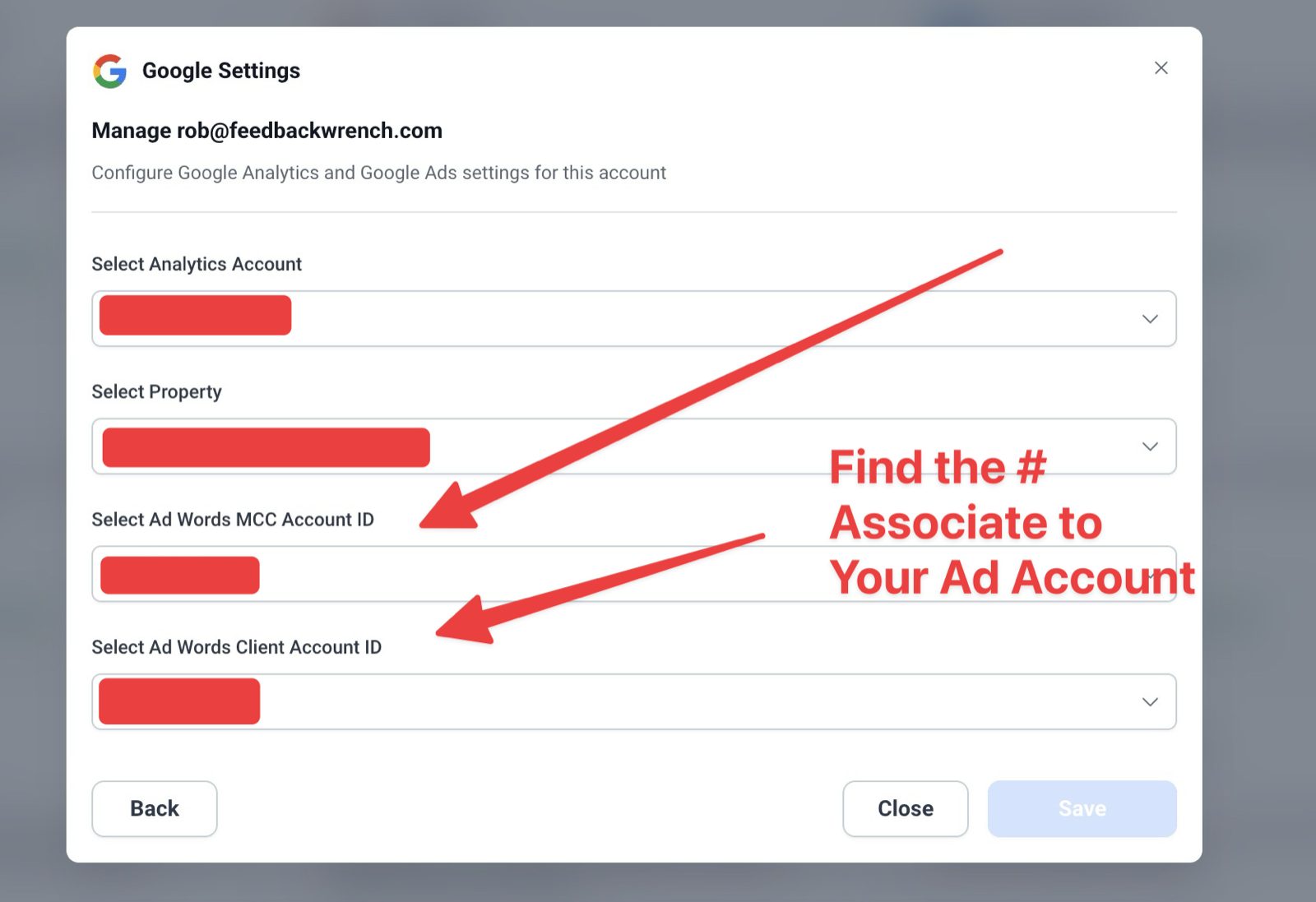
▶Video walkthrough coming soonScreenshot showing where the customer ID appears and the Managers approval screen.
How to do it
Go to ads.google.com and sign in with your business Google account.
Create the account. Skip any campaign setup Google suggests. We'll build it right.
Add your billing info.
Find your 10-digit customer ID at the top of the screen.
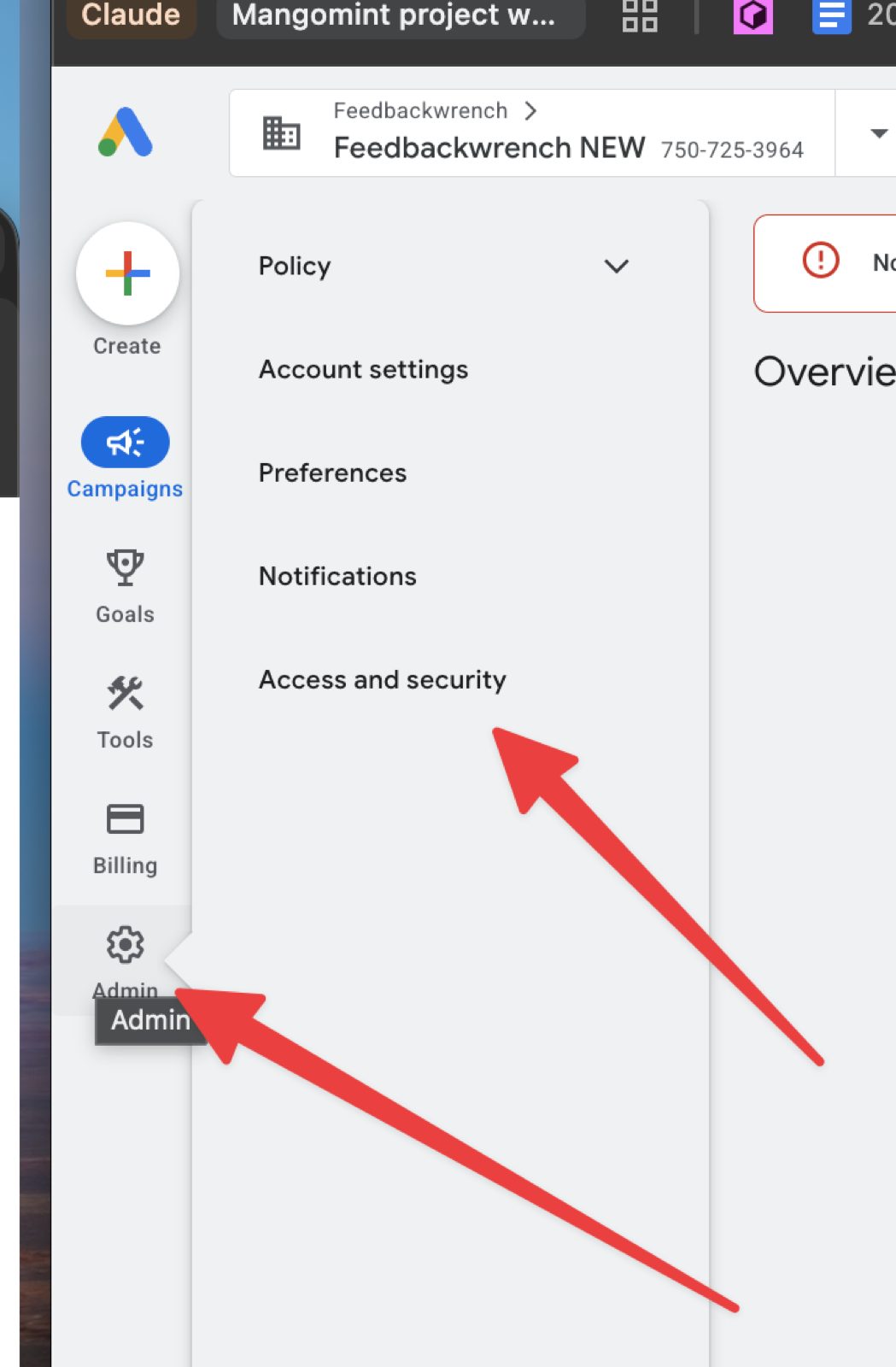
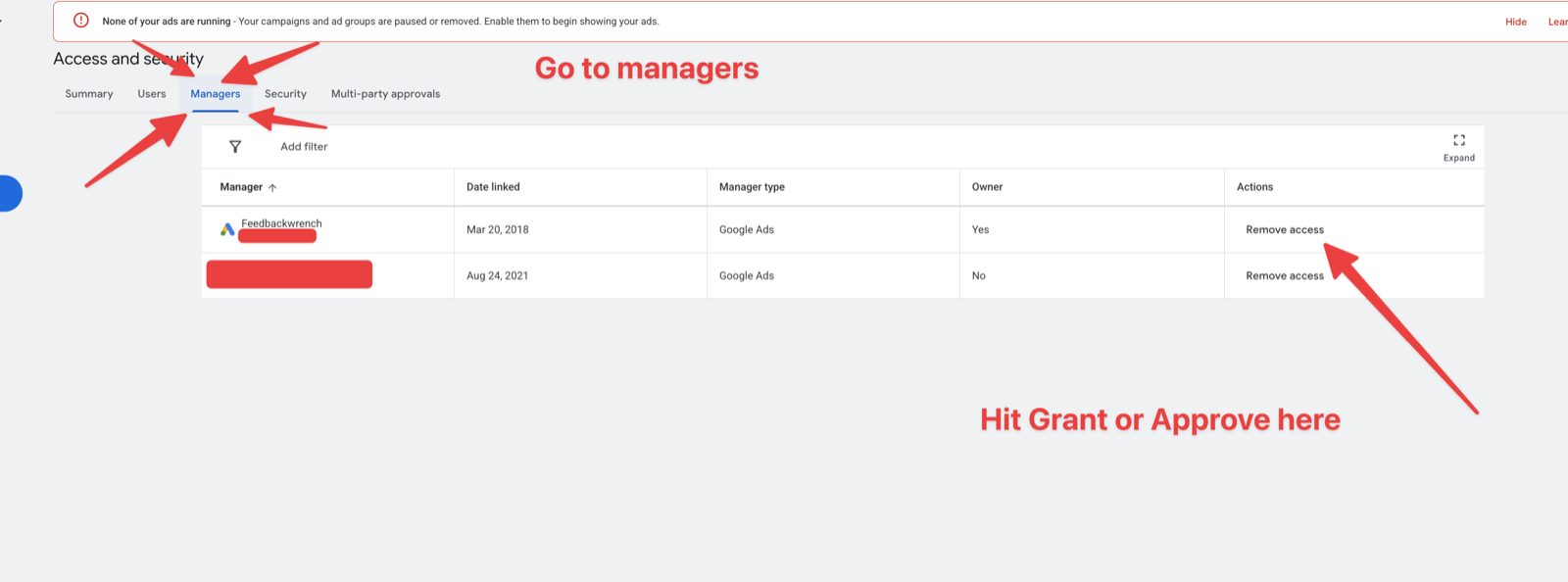
Send us that number. We'll send an access request from our manager account (840-717-5948). Accept it under Admin, then Access and security, then Managers.
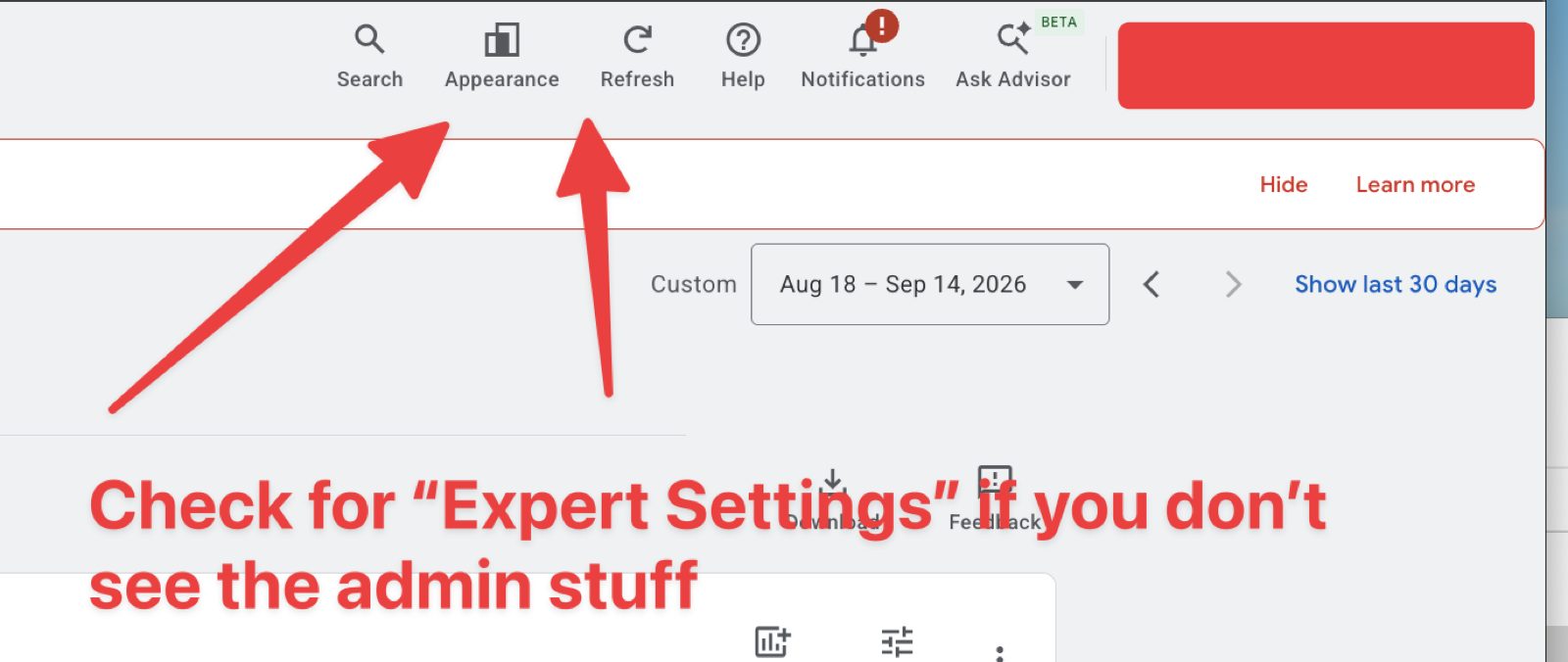
Admin (the gear icon), then Access and security.On the Managers tab, approve the Feedbackwrench request.No Admin menu? Check Appearance and switch to Expert mode.
Good to know
Create the ad account on the same Gmail as your Google Business Profile, and sign out of other Google accounts first.
You can also start from the Advertise button inside your Business Profile.
Our manager account number is 840-717-5948, so that's the name you'll see on the request.
Send us
Your 10-digit Google Ads customer ID.
Tip
Already have an account? Just send us the ID. Don't make a new one.
Texting is the fastest way to reach leads. Carriers require business registration (called A2P 10DLC) before you can text customers from your business number.
▶Video walkthrough coming soonScreenshot of the texting registration screen.
How to do it
In your app, get a local business phone number.
Start the business texting registration.
Have your legal business name, EIN, address and website ready.
Your website needs a privacy policy and texting terms. We'll help.
Approval usually takes a few days.
Send us
Tell us when you've submitted the registration.
Tip
Use your exact legal name and EIN as they appear with the IRS.
You don't need to know code. Tell it what you want changed, like you'd tell a person, and review the result before it goes live.
◉ Preview▭/servicesPublish
Outdoor living, done right.
◉ Preview▭/servicesPublish
Outdoor living, done right.
◉ Preview▭/servicesPublish
Patios built to last.
◉ Preview▭/servicesPublish
Patios built to last.
Step 1 of 4
Click into Ask AI. Name the page and the section.
Animated walkthrough
See it in actionEdit your website
This is Mashbooks, a CPA firm site our team built, open in the editor. Click anything and change it, or just ask, even with a screenshot from your phone. Preview it, then publish.
◉ Preview</>▭ /Publish
MashbooksClean books. Taxes planned.Book a Free Review →
Your numbers are in expert hands.
Direct oversight from an experienced CPA who understands the weight of your business decisions.
Most small changes are quick to do yourself. Some are worth a second set of eyes.
yourcompany.com/services
Patios built to last.
➜ add Prior Lake here
New email
To: support@feedbackwrench.comSubject: New town page for Prior Lake
Can you add a Prior Lake page like our Lakeville one? Screenshot attached.
Inbox
Feedbackwrench SupportRe: New town page for Prior Lake
On it. We'll send a preview link by Thursday.
Step 1 of 3
Take a screenshot of the page and mark what you want.
Animated walkthrough
How to do it
New pages for SEO, like new service or town pages.
Changes to forms, tracking or your booking calendar.
Anything that changes your whole look, like colors, fonts or navigation.
Anything you're unsure about. Email support@feedbackwrench.com with the page and what you want.
Step 7Owner or marketing lead⏱ Coming soonComing soon
Design with Claude Design
For bigger changes, like a new landing page or a redesigned section, we use Claude Design with your brand system. We'll walk you through it once your site is live.
▶Video walkthrough coming soonWalkthrough video coming soon.
How to do it
We set up your brand system in Claude Design.
You describe the page or section you want.
Claude designs it in your colors, fonts and style.
We review it with you and publish it to your site.
Tip
Start with the basics first. This step comes after you're comfortable with Ask AI.
 GmailGmail or Google Workspace
 OutlookOutlook or Microsoft 365
 Facebook
 Instagram
 Google Business
 LinkedIn
 TikTok
 YouTube
 Pinterest
 GoogleAnalytics and Ads
 QuickBooksCustomers and invoices
 XeroCustomers and invoices
 Import from HubSpotRecords, custom fields and associations

 Garden-view deckFarmington
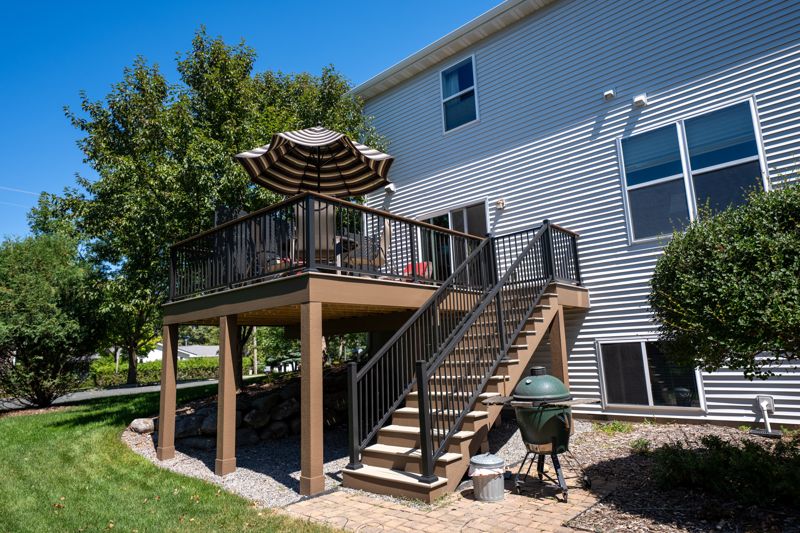 Two-level deckApple Valley